Three situations
- SKU, bin and listing link per item. Add each item with custom fields SKU, Bin and Listing link, plus the cost you paid. Put it in the Group of its bin ("R3, rack 3"). When an order comes in, scan the bin label, open the item, subtract one.
- Before listing: count and photograph. Sourcing day ends with a table of items. Add each with two photos and a quantity, Tag it "Needs listing", and list from your list. When it is listed, change the Tag to "Listed" and the filter shows what is still unlisted.
- Returns and bulk lists. Keep a "Returns box" Group: returned items go there and get the Tag "Relist". When a supplier sends a spreadsheet, import it from CSV (Premium) and export your counts back when you reconcile.
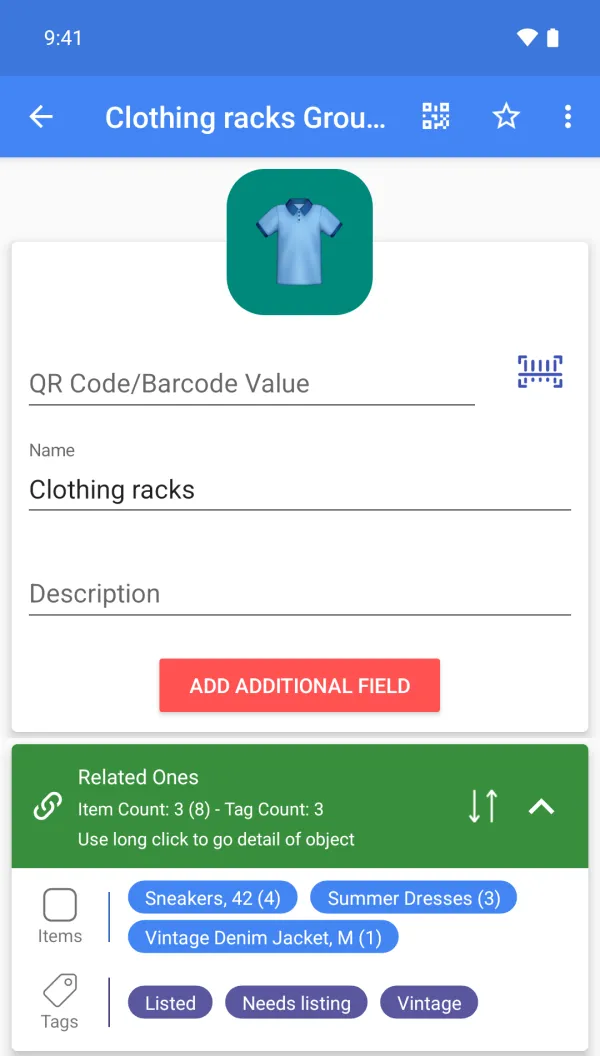
A sample setup
| Item | Group | Tags | Custom fields (Premium) | Qty |
|---|---|---|---|---|
| Vintage denim jacket, M | Rack R3 | Needs listing | SKU VDJ-014, Bin R3, Cost 12 | 1 |
| Ceramic mug set | Shelf S2 | Listed | SKU CM-006, Bin S2, Listing link /cm-006 | 8 |
| Leather wallet, brown | Drawer D1 | Listed, Relist | SKU LW-021, Bin D1 | 2 |
| Brass candle holder | Shelf S5 | Needs listing | SKU BC-003, Bin S5, Cost 4 | 5 |
| Returns box | Returns | Relist | Box R-01 | 6 |
Scanning, for this job
Scan the QR label on a bin when you pick an order, or scan a product barcode if you added it before. Scanning opens your own item; it does not fetch marketplace data.
What it does not do
No connection to any marketplace: quantities are not synced to listings, so you update counts yourself. It does not print shipping labels or manage orders.
FAQ
Does it update my marketplace stock?
No. It is your own inventory; there is no marketplace integration.
Can I bulk import and export?
Yes, CSV import and export (Premium).
Can I use my account on several devices?
Yes, one account can be signed in on several devices. Cloud backup is Premium; upload or download the cloud copy manually. There is no multi-user sharing or automatic two-way sync.
Is it free?
Free to start: items, groups, tags, photos and barcode or QR scanning and creation are free. Custom fields, cloud backup, the web app, CSV, Google Drive, quantity history with notes and email alerts are Premium. Plans and prices are shown on Google Play.