Three situations
- Vinyl: condition and pressing per record. Create custom fields for Label, Year, Pressing and Condition, and set them as defaults so every new record starts with them. Photograph the sleeve and the label. Put each record in the Group of the shelf it lives on, and tag the sets ("Jazz", "Wishlist").
- At the fair: do I already own this?. Standing at a stall, search by title or artist, or scan the barcode of a record you added before. If it is in your catalog you see the pressing and condition; if not, you add it on the spot with a photo and your price.
- Cards and sets in binders. Treat each binder as a Group and each set as a Tag. Quantity tells you how many copies you hold; the Condition field separates the sleeved mint copy from the playing copy. Print a QR label for a box of bulk cards and scan it to see what is inside.
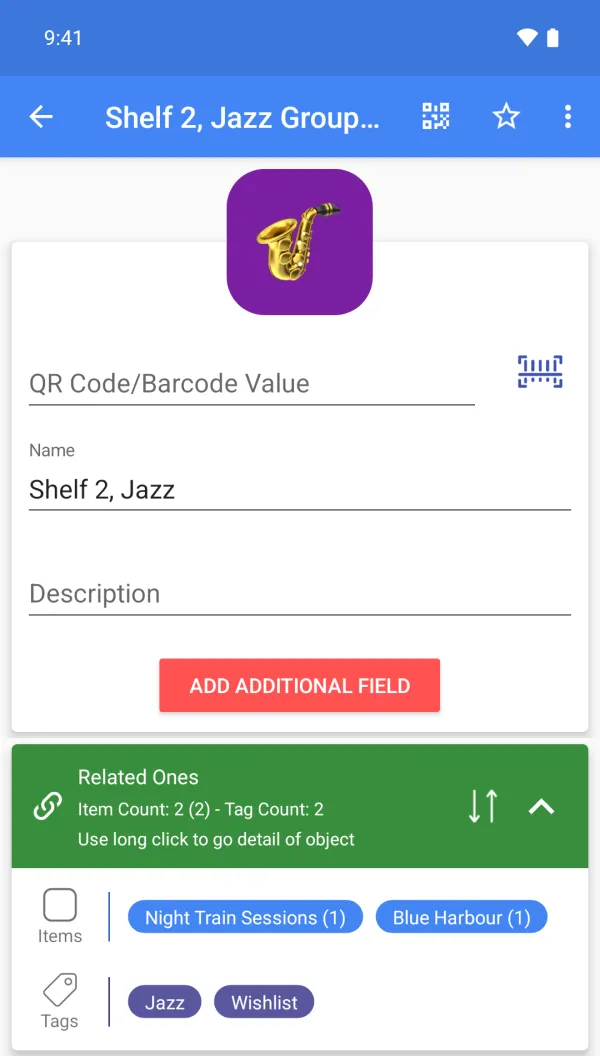
A sample setup
| Item | Group | Tags | Custom fields (Premium) | Qty |
|---|---|---|---|---|
| Blue Harbour, The Marlow Quartet | Shelf 2, Jazz | Jazz | Label Northgate, Year 1961, Condition VG+ | 1 |
| Night Train Sessions | Shelf 2, Jazz | Jazz, Wishlist | Pressing UK 1st, Condition M- | 1 |
| Meridian, Anna Sol | Shelf 4, Soul | Soul | Year 1974, Condition VG | 2 |
| Starter deck, series 3 | Binder A | Series 3 | Edition 2024, Condition Mint | 3 |
| Film camera FC-1190 | Display case | Fragile | Serial FC-1190, Condition Working | 1 |
Scanning, for this job
Scan the barcode of a record or box you added before to open it; scan a QR label on a box to see what is inside. There is no built-in catalog of records or cards, so every piece is added by you once.
What it does not do
No built-in catalog of records, cards, coins or games, and no price lookup: you add your own pieces, which also means any kind of collection fits.
FAQ
How many pieces can I add?
The core app has no limit on items, groups or tags.
Can I browse my catalog on a computer?
Yes, with Premium: the web app opens your catalog in a browser.
Can I back it up?
Cloud backup (Premium), and CSV or Google Drive export (Premium).
Is it free?
Free to start: items, groups, tags, photos and barcode or QR scanning and creation are free. Custom fields, cloud backup, the web app, CSV, Google Drive, quantity history with notes and email alerts are Premium. Plans and prices are shown on Google Play.