Three situations
- Laptops and monitors, assigned to people. Add each laptop with Serial number, Purchase date and Assigned to. Search by a name to see everything someone holds. Stick a QR label on the device: scan it to see the serial, the owner and the warranty.
- The supply cupboard, checked weekly. Give supplies a critical level: paper 3 reams, toner 1, batteries 8. Once a week open the below-level filter and order what it shows. With Premium, an email alert reaches the office manager when toner drops under its level.
- Onboarding and leaving. For a new hire, set Assigned to on the laptop and the headset. When someone leaves, search their name and tick off everything that comes back, scanning each label. Items that did not come back stay in the list.
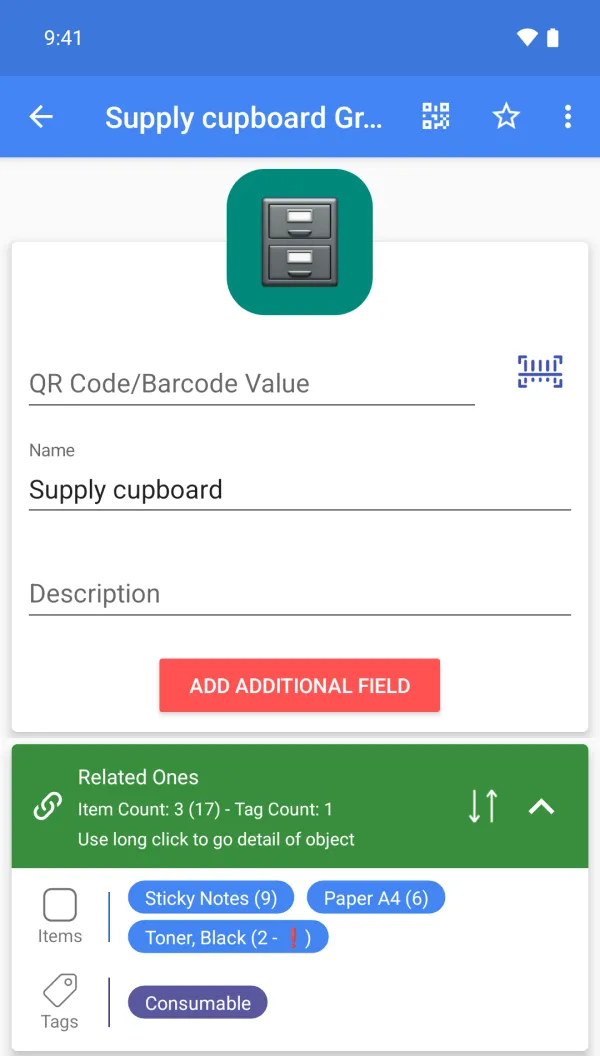
A sample setup
| Item | Group | Tags | Custom fields (Premium) | Qty |
|---|---|---|---|---|
| Laptop L-014 | Desk 4 | Laptop, Under warranty | Serial L014-77X, Assigned to A. Rivera, Bought 2025-02 | 1 |
| Monitor 27 inch | Desk 4 | Monitor | Serial M27-2290, Assigned to A. Rivera | 1 |
| Toner, black | Supply cupboard | Consumable | Critical level 1 | 2 |
| Paper A4 | Supply cupboard | Consumable | Critical level 3 | 6 |
| Webcam | Meeting room | - | Serial WC-118, Assigned to Meeting room | 2 |
Scanning, for this job
Scan the QR asset label on a laptop or monitor to open its record in a second; scan it again at hand-back. Labels are printed from the app.
What it does not do
It is an inventory list, not IT asset management or a ticketing system: no check-in and check-out workflow, no depreciation, no purchasing.
FAQ
Can I see who has a laptop?
Yes: add an "Assigned to" custom field and search or filter by it (Premium).
Can I use my account on several devices?
Yes, one account can be signed in on several devices. Cloud backup is Premium; upload or download the cloud copy manually. There is no multi-user sharing or automatic two-way sync.
Can I export it for finance?
CSV or Google Drive export (Premium).
Is it free?
Free to start: items, groups, tags, photos and barcode or QR scanning and creation are free. Custom fields, cloud backup, the web app, CSV, Google Drive, quantity history with notes and email alerts are Premium. Plans and prices are shown on Google Play.